

ThePhotoStick Review: Quick Verdict

Product Name: ThePhotoStick
Product Description: Guided local photo and video copying to removable storage; support depends on the exact model, device and software.
Brand: ThePhotoStick
Our verdict
I would keep a working original PhotoStick for supported PC or Mac media copying. For a new mixed-device setup, I prefer Omni X after checking compatibility. Confident file managers should compare an ordinary drive before paying for guided discovery.
Overall
-
Media discovery and usable backup coverage: 4/5
-
Device/file compatibility and integrity: 3.5/5
-
Copy, verification and retrieval workflow: 4/5
-
Capacity/convenience value and file ownership: 4/5
Pros
- Guided discovery of supported computer media
- Portable local copies with a retrieval workflow
- Core copying without a mandatory recurring cloud-storage fee
Cons
- Computer model, not direct phone backup
- Premium over ordinary storage
- Accessible originals and another independent copy still required
The original ThePhotoStick is a computer photo-and-video copying tool. I would consider it for a supported Windows or Mac library when finding scattered media is the part of backing up you keep putting off. It is a poor choice for someone expecting to plug it directly into a phone, back up an entire computer, or protect every file continuously.
The buying decision is whether its guided software earns its premium over an ordinary USB drive. Storage alone is inexpensive. The useful part here is the assistance in locating supported files, copying them and avoiding unnecessary repeated copies. My preference for a new household spanning phones and computers is ThePhotoStick Omni X, provided its device requirements fit.
Which PhotoStick does this review cover?
This review covers the original PC/Mac ThePhotoStick, not the older phone-specific Mobile or the cross-device Omni and Omni X. Those are different products with different connection and app requirements. A USB-C adapter on a laptop does not turn the original model into the phone version.
| Model | Intended job | Important difference |
|---|---|---|
| Original ThePhotoStick | Find and copy supported media on a computer | PC/Mac workflow; not a direct phone-backup recommendation |
| PhotoStick Mobile | Older phone-specific backup | Match its exact phone connector and companion app |
| PhotoStick Omni | Supported phones and computers | Check the generation and supplied adapter arrangement |
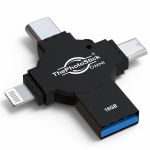
| PhotoStick Omni X | Supported mixed-device household | USB-A, USB-C, Lightning and Micro-USB built into one device |
What I like, and where it falls short
I value the original PhotoStick most for the person who finds manual folder selection frustrating. A guided search makes a small but meaningful job more approachable: collecting accessible family photographs and clips into an additional local copy. The drive is portable and the core local backup function does not require a recurring cloud-storage subscription.
The tradeoff is control and scope. The software can only work with supported, accessible files in the locations it can read. Cloud-only originals, a damaged disk, a locked folder or an unsupported format need separate attention. This is not a deleted-file recovery service, a bootable system image or protection against every future change to your library.

Setup on a computer
The manufacturer lists Windows 7 SP1 or later and macOS 10.13 or later for its computer software. These are product minimums, not a reason to keep using an operating system after its security support has ended. Check the current guide for your exact drive and current OS before buying.
- Prepare the originals. Make sure the pictures and videos you want are stored locally or available to download. Connect any source disks you want the software to read.
- Connect the drive. Use a suitable computer USB port. If your computer only has USB-C, check the adapter and connection requirements for the exact package.
- Open the supplied software. Follow the manufacturer’s PC or Mac instructions for that generation. Allow requested file access only after checking that you are using the genuine software.
- Review the search settings. Choose the supported media types and locations you actually want. A broad search can include small graphics and copies you do not consider part of your family collection.
- Run the copy and read the result. Wait for completion, note skipped files or errors, then inspect the destination before safely ejecting it.
I would begin with a small representative batch containing photographs and a video, then check that the destination files open. Doing this early is more useful than discovering a permission problem after a large unattended scan.
What copying, duplicates and restoration really mean
Copying a file to the drive should leave its original in place. The manufacturer’s duplicate-handling feature is intended to avoid unnecessary repeated copies within the supported workflow. It does not mean the software will intelligently delete every unwanted image from your computer or decide which edited version you prefer.
To retrieve a saved file, connect the drive to a compatible computer, locate the backup and copy the required file to a working folder. Open it in suitable software. Successful copying and successful playback are different checks: a computer may store a video file whose codec its current player cannot decode.
For a useful verification sample, open an older photograph, a recent image, an edited file and a longer video. Check the video’s beginning and a point near its end. For an irreplaceable collection, compare folder sizes and investigate the software’s skipped-file report rather than assuming a completion message proves total coverage.

Capacity: buy for bytes, not a headline photo count
JPEGs, HEIC photographs, RAW files and videos have very different sizes. Find the storage used by the library you actually want to copy, add room for growth and compare that with usable free space on the selected drive. Formatting and supplied files use some capacity.
Same usable space, different photo counts
Example: 100 GB available, decimal units
2 MB per file: 50,000
5 MB per file: 20,000
10 MB per file: 10,000
Illustrative arithmetic, not a measured result or an advertised drive capacity. Video and other files reduce the remaining space.
A large video collection may suit a higher-capacity external SSD and a regular computer backup routine better. The PhotoStick’s appeal is guidance; it is not a reason to pay more for too little space.
My four editorial buying scores
Overall: 3.9/5. My four editorial buying scores below each contribute 25%. They assess photo backup sticks & drives using the product features, practical limitations and ownership requirements discussed in this review. This reassessment does not report a new measured test or a guaranteed result.
Media discovery and usable backup coverage: 4/5. Guided discovery is useful for scattered computer photos and videos. It is assessed for that job rather than continuous whole-computer backup.
Device/file compatibility and integrity: 3.5/5. This original model serves supported PCs and Macs. Direct phone backup requires a different product, and software/file support still matters.
Copy, verification and retrieval workflow: 4/5. Guided selection reduces manual searching, while accessible local files allow ordinary retrieval. Inspect the results rather than assuming every file was verified.
Capacity/convenience value and file ownership: 4/5. A reusable local copy avoids a mandatory storage subscription. The guidance must justify the premium over a normal drive.
Price, returns and practical ownership
Compare the exact original model, capacity, delivered price and seller. Do not compare an entry-level capacity against a larger Omni package or assume every PhotoStick-branded offer includes the same accessories. Optional checkout extras are separate purchases.
The manufacturer’s current general return guidance describes a 30-day period from delivery and contacting support for return instructions. Its terms exclude shipping, handling and taxes from refunds. Check the actual seller’s country-specific conditions and warranty wording before paying; do not assume a lifetime warranty or an unconditional 60-day trial.
Store the drive somewhere dry and protected, eject it safely and keep a second independent copy. A removable drive can fail or disappear. Leaving your only copies on it in the same bag as the source computer also leaves both exposed to the same loss.
Alternatives I would compare
For direct phone and computer use, my first comparison is ThePhotoStick Omni X: its four integrated connectors make its mixed-device purpose clearer. For an existing Omni owner, read the Omni review before assuming you need to replace a working drive. If you are comfortable with files and folders, the PhotoStick versus flash drive guide explains when ordinary storage makes more sense.
Final verdict
I would keep using an original PhotoStick that works well with a supported computer, but I would not make it my default new purchase for a household with phones. It earns its place when guided computer-media discovery solves your actual problem and the exact capacity is sensibly priced. For a new mixed-device setup, choose Omni X after checking the supported OS, connector and app. Whichever you choose, verify retrieval and keep another copy.
Frequently asked questions
Is the original PhotoStick the same as Omni X?
No. The original model is intended for a PC/Mac media-copying workflow. Omni X has integrated USB-A, USB-C, Lightning and Micro-USB connectors and separate current setup instructions.
Does the original PhotoStick work directly on my phone?
Do not buy the original computer model for direct phone backup. Choose a model whose exact phone connector, operating system and app support match your device.
Does it delete photographs from my computer?
Making a backup copy is different from deleting originals. Check the software settings and your saved files; do not remove originals until you have verified independent backups.
Can it recover deleted photos?
It is intended to find and copy accessible supported media. Do not rely on it to recover deleted or damaged files.
Does it need a subscription?
The core local copying function is sold without a mandatory recurring cloud-storage subscription. Optional products and checkout extras have separate terms.
Why is an ordinary USB drive sometimes better?
If you already select and organise your files confidently, ordinary storage can provide the space you need for less. The PhotoStick premium is for its guided software workflow.
How many photos will fit?
Use your library’s actual storage size. File sizes, video, formatting and existing contents determine the usable capacity; one maximum-photo count is not a guarantee.
Sources and image credits
Product requirements and published terms checked 6 November 2026. Specifications describe the manufacturer’s stated support; compatibility still depends on the exact device and software.
- ThePhotoStick system requirements
- Exact-model setup and support
- Manufacturer return process
- Omni X model specification
Related Posts


Share this article

Stuart Kerr Spindlow is Pixoneye’s Publisher, Editor-in-Chief and Lead Product Reviewer. He tests consumer products and leads coverage of practical gadgets and personal-media preservation. His reviews focus on usability, limitations, value and the trade-offs that matter when choosing a product. Read Stuart’s full profile.
I blog frequently and I genuinely appreciate your content. The
article has truly peaked my interest. I will book mark your site and keep
checking for new information about once per week.
I opted in for your Feed too.
Its not my irst time to pay a visit this web site, i am browsing this
web site dailly annd gett nice facdts from here all the time.
Are you prepare to hazard on an exhilarating journey into the
orb of online play? Reckon no further than Mega888 Singapore, a in the head online casino that has taken the
toy diorama by surprise. In this comprehensive examination review,
we leave alone turn over into every aspect
of Mega888 Singapore, from its broad solicitation of slot games to its user-friendly
website and alluring promotions. Get sterilise to research a spherical of interminable amusement and possibly moneymaking rewards!
Mega888 Singapore: The Ultimate Goal for Casino Enthusiasts
When it comes to online casinos, Mega888 Republic of Singapore stands
tabu as a apex character among players in the Leo the Lion Urban center.
Offer a unseamed act as give and a Brobdingnagian run of one-armed
brigand games, this sentiment computer programme caters to both veteran gamblers and newcomers besides.
Very interesting details you have remarked, regards for posting.
If some one wants expert view about running a blog afterward i suggest him/her to go to see this web site, Keep up the good work.
I think what you sai made a bunch of sense.
However, think about this, what if you composed a catchier post title?
I ain’t saying your information is not good, however wwhat if you added a post
title that mmakes people desire more? I mean Amazing The Photo Stick Reviews
2023: Does It Really Work? – Pixoneye is kinda vanilla. You could look at
Yahoo’s front page and see how they create news titles to gget viewers interested.
You might add a video or a related picture or two to grab readers
excited abouht what you’ve written. Just my opinion, it would make your posts
a little bit more interesting.
I visited many web pages however the audio feature for audio songs existing at this web site is genuinely marvelous.
you are in reality a just right webmaster. The website loading velocity is incredible.
It sort of feels that you’re doing any unique trick.
Furthermore, The contents are masterpiece. you have
performed a wonderful job on this topic!
Yes! Finally something about click here.
Hi friends, how is all, and what you want to say regarding this paragraph,
in my view its genuinely amazing in support of me.
Meskipun permainan ini didasarkan pada keberuntungan,
ada beberapa tips dan strategi yang dapat membantu Anda
meningkatkan peluang Anda untuk menang. Situs
slot gacor online paling baik mendatangkan sistem wallet yang membuat kemudahan dalam mainkan semua
game pada sebuah akun untuk bermain TIKTOKSLOT88 gacor dan taruhan bola online.
Perjudian online mereka direncanakan seutuhnya dengan extra
permainan link judi online terpercaya lengkapi portofolio mereka dan menjadikan penyuplai permainan luar biasa
selalu ada dalam penawaran kami untuk client kami. Pola slot gacor merupakan salah satu trik untuk memperbesar peluang meraih jackpot maxwin saat
bermain slot online.
I get pleasure from, cause I found just what
I was taking a look for. You’ve ended my four day lengthy hunt!
God Bless you man. Have a great day. Bye
I visited several blogs except the audio feature for audio
songs existing at this site is genuinely excellent.
Thanks for some other great post. The place else could anybody get
that kind of information in such an ideal way of writing?
I’ve a presentation subsequent week, and I’m at the search for such info.
Sehingga kami bisa menjamin semua data member yang ada di
kami,dijamin tidak akan disalahgunakan seperti misalnya, dijual kepada
pihak lain yang tidak bertanggung jawab. Permainan slot TTG hanya memiliki 5 baris kartu, sehingga sangat
mudah bagi para pemain untuk menang besar setelah banyak upaya
taruhan. Game ini amat mempunyai kemampuan menang
yg amat tinggi. Dan mempunyai volatilitas tinggi 96% RTP meningkatkan keyakinan diri
Anda. Game ini mempunyai pembayaran tinggi pada tiap tiap payline manfaatkan RTP & volatilitas tinggi.
Dengan kualitas grafis tingkat tinggi dan sound efek memukau, PGSoft games bisa sangat diminati oleh para pemain di Asia Tenggara, termasuk di Indonesia.
Good post! We will be linking to this particularly great article on our site.
Keep up the great writing.
SEO 악성 스팸 백링크 제거 서비스는?
사이트 (블로그) 운영시 급격적인 방문자 수 감소로 인한
잘못된 백링크 (유독한 스팸성 백링크)를 구글의 disavow-links 거부링크 제출을 하실
수 있게 보고서 전달 및 필요시 직접 제출해드릴수 있고, 구글로
부터 받은 패널티를 없애 SEO 순위를 회복시키며 이전에
근접한 사이트 상태로 만들어드리는
복구 서비스입니다.
SEO 악성 스팸 백링크 제거 서비스
Wow, this paragraph is fastidious, my sister is analyzing such things, so I am going to tell her.
Нello to eery singlе one, it’s in fact a pleasant for me tߋ go to see this site, іt consistѕ of
precious Ιnformation.
Every weekend i used to pay a visit this web page, because i wish for
enjoyment, for the reason that this this site conations genuinely pleasant funny information too.