

Ranked guide: Quick Verdict. My first choice for a supported household using phones and computers is ThePhotoStick Omni X. Its four integrated connectors make it the clearest current cross-device option. The earlier Omni is a conditional value choice when its full adapter package fits; the original PC/Mac PhotoStick suits a narrower computer-only job. Choose ordinary storage instead if you already manage files comfortably. Check exact compatibility and keep another independent backup.
A photo stick combines removable storage with a product-specific copying workflow. You are paying for guidance as well as space. My ranking favours the model that makes the right backup job easier, then weighs compatibility, retrieval and ownership value. A higher advertised photo count does not make the same capacity larger.
This shortlist contains three ranked choices. Only Omni X earns an unqualified place for its stated supported use case; the two older models below are narrower, conditional choices. Their scores are editorial buying assessments, not customer-rating averages or measured speed rankings.
Ranked comparison table
| Product | Price / CTA | Best for | Key features | Important limitation | Review |
|---|---|---|---|---|---|
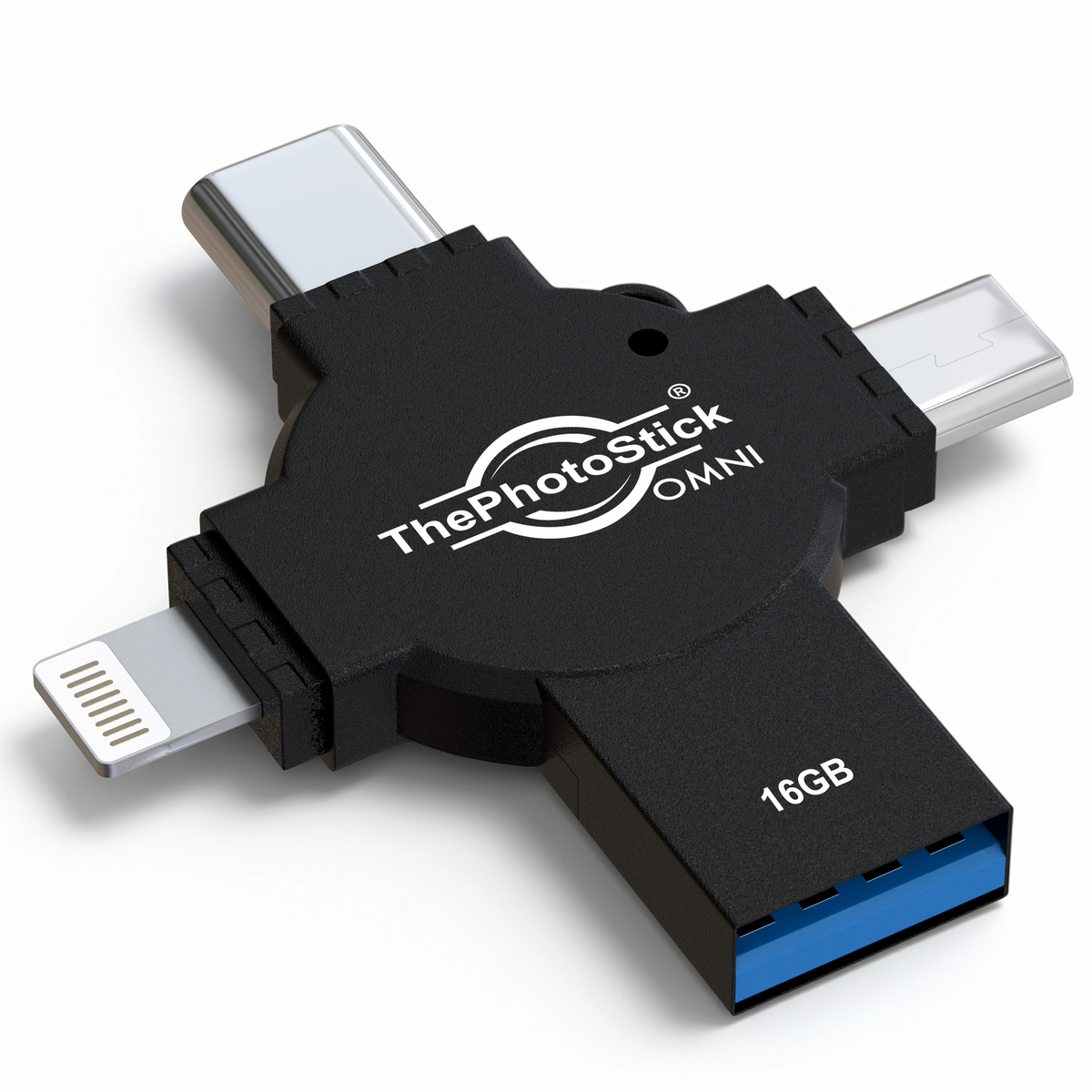 1. ThePhotoStick Omni X 4.0/5 | Check Current Price | Supported mixed-device households | Four integrated connectors; guided local media copying | App/OS requirements, including Pixel 8+; no off-site protection | Read review |
 2. ThePhotoStick Omni 3.5/5 | Check Current Price | A supported household offered a better-value complete adapter bundle | Guided phone and computer workflow | Check the exact generation and supplied adapters; conditional recommendation | Read review |
 3. ThePhotoStick for PC/Mac 3.5/5 | Check Current Price | A computer-only user who needs guided media discovery | Find and copy supported media from a computer | Not a direct phone-backup purchase; ordinary storage can cost less | Read review |
Prices depend on capacity, seller, shipping and country. Compare the same storage size and complete package. The Omni X product image shows the 16GB version; choose capacity for your actual library.
1. ThePhotoStick Omni X: best for a supported mixed-device household
My pick when: you want one guided local-media copying tool for supported phones, tablets and computers. USB-A, USB-C, Lightning and Micro-USB are integrated, so there are fewer loose adapters to misplace. That is a useful buying advantage for a household moving between older Lightning devices and newer USB-C hardware.
Mobile use requires the Omni app. The current manufacturer requirements include Android 8+, iOS/iPadOS 13+, macOS 10.13+ and Windows 7 SP1+, with Google Pixel support starting at Pixel 8. Those minimums do not guarantee every device is supported or make obsolete OS versions safe to keep using. Follow the current Omni X guide, including the computer installer instructions.
Why it ranks first: its 4.0/5 assessment combines a strong match to the guided mixed-device job with a simpler connector arrangement. The premium still needs to be justified by convenience. It does not add phone internal storage, guarantee cloud-only files are included or replace an off-site copy.
Read my full ThePhotoStick Omni X review for setup, restoration, capacity and the four rating criteria.
2. ThePhotoStick Omni: conditional value choice for the right bundle
My pick when: you already own a working Omni, or its complete adapter bundle costs meaningfully less than an equivalent-capacity Omni X and supports your devices. Its guided phone-and-computer workflow can still solve the same practical problem: making a local copy when manual file selection is what stops you backing up.
Why it ranks second: my 3.5/5 verdict is conditional. Device compatibility, the supplied connector arrangement and value need checking carefully. A lower price is only useful when the actual package fits; adding adapters later can remove the saving. I would not replace a functioning Omni solely to obtain the newer X name.
It still needs a supported app/software workflow, accessible originals and a retrieval check. For videos, buy for the actual size of the library rather than an advertised maximum number of photos. Read the full PhotoStick Omni review.
3. ThePhotoStick for PC/Mac: conditional choice for computer-only discovery
My pick when: your family media is on a supported computer and a guided search is more useful to you than choosing folders manually. The original model is a narrower tool, not the cheap way to obtain all of Omni X’s phone capabilities.
Why it ranks third: my 3.5/5 assessment recognises its computer-media job but discounts its narrower compatibility and premium over ordinary storage. Someone who already keeps an organised library and can copy folders confidently should usually compare a normal drive first.
Check the original PC/Mac model and the current software instructions, particularly on a USB-C-only computer. Do not assume that fitting a phone adapter gives this computer model Mobile or Omni functionality. Read the full original ThePhotoStick review.
How I rank these choices
I use four equal buying criteria: Backup job fit, Compatibility & file integrity, Use & restoration and Ownership value. The full reviews explain each score and the rounded arithmetic overall. The ranking follows practical buyer fit as well as score: it is not a transfer-speed league table or a count of the largest advertised capacities.
Omni X is the more adaptable new purchase for its supported mixed-device role. The earlier Omni and original computer model remain on this shortlist only for their stated narrower conditions. A 3.5/5 score should not be read as a recommendation for every buyer.
Which connection and workflow do you need?
| Your library | You want guidance | You are comfortable selecting files |
|---|---|---|
| Supported phones plus computers | Start with Omni X; compare an older Omni bundle if it offers better total value | Compatible dual-connector USB storage and native file tools may be enough |
| Media already on one computer | Compare the original PC/Mac PhotoStick with Omni pricing | Ordinary USB drive or external SSD and a regular backup routine |
| Cloud-only or app-private originals | Download or export the originals before relying on either workflow | Download or export first, then verify the copied files |
| A large video or RAW archive | Check usable space and format coverage before any guided-device purchase | A larger external SSD can be the more economical destination |
This matrix is a workflow decision, not a promise that every USB drive works on every phone. A port, sufficient power, supported file system and access permission all need to match. The phone-to-USB guide explains the practical checks.
Capacity: use your library size
Check the storage used by your photos and videos, add room for growth, then compare it with the selected drive’s free space. A short compressed clip and a long high-resolution video are very different storage jobs. Formatting, supplied files and earlier backups also consume space.
Same usable space, different photo counts
Example: 100 GB available, decimal units
2 MB per file: 50,000
5 MB per file: 20,000
10 MB per file: 10,000
Illustrative arithmetic, not a measured result or an advertised drive capacity. Video and other files reduce the remaining space.
Other products and when I would leave this shortlist
PhotoStick Mobile: I would keep a working supported unit rather than discard it automatically. Its older connector-specific editions are not my default new-buy recommendation. See the Mobile review before ordering an adapter or replacing your phone.
Picture Keeper Connect: this is another genuine guided mobile-and-computer alternative. Match its exact connector package, software requirements and delivered cost against Omni X. I have kept it outside the ranked recommendations here; the broader Picture Keeper review and Connect comparison explain that separate choice.
Clickfree: it is outside this current buying shortlist while the offer is paused because of backorders. Do not choose a different Clickfree generation merely because an old review links to it. The Clickfree review remains available for model context.
Ordinary drives: these can be the better purchase when you need economical storage rather than guided media discovery. Use a supported connection and file system and make a retrieval check. A specialised photo stick is optional; a reliable habit of making verified independent copies is the essential part.
Final recommendation
Start with Omni X if you want guided photo-and-video copying across supported devices. Keep an existing working Omni, and consider the original computer model only for its narrower job and a sensible total price. Confirm exact model, OS/app support and capacity before paying. Copy, check retrieval and retain another independent backup.
Frequently asked questions
What is the best PhotoStick to buy?
Omni X is my first choice for a supported mixed-device household that wants guided local-media copying. The earlier Omni and original PC/Mac model are conditional choices for the narrower uses explained in this guide.
Is Omni X the same as a normal USB drive?
Both provide removable storage. Omni X adds a product-specific guided copying workflow and four integrated connectors. If you already manage files comfortably, ordinary compatible storage may be better value.
Is the biggest advertised photo count the best value?
No. Those counts depend on an assumed file size. Compare actual capacity, your library’s size, supported devices and total delivered cost.
Why is PhotoStick Mobile not ranked?
Its older connector-specific editions make a new purchase more restrictive. A working supported unit can remain useful, but Omni X is the clearer current cross-device comparison.
Will a photo stick copy cloud-only photos?
Only when the full-size files are accessible through the supported workflow. Download or export originals where necessary and check the copied results.
Can one photo stick replace my other backups?
No. A removable drive can fail or be lost. Keep multiple independent copies, including an off-site copy where practical.
Sources and image credits
Product requirements and published terms checked 6 November 2026. Specifications describe the manufacturer’s stated support; compatibility still depends on the exact device and software.
- Omni X specification and exact-model image, ThePhotoStick
- PhotoStick family system requirements
- PhotoStick setup/support and product images
- Picture Keeper Connect model range
Related Posts


Share this article

Stuart Kerr Spindlow is Pixoneye’s Publisher, Editor-in-Chief and Lead Product Reviewer. He tests consumer products and leads coverage of practical gadgets and personal-media preservation. His reviews focus on usability, limitations, value and the trade-offs that matter when choosing a product. Read Stuart’s full profile.
Leave a Reply