
Comparison: Quick Verdict
I would choose the RS 3 for a supported mirrorless setup within its 3kg tested payload: automated axis locks and Bluetooth shutter control make repeated setup more convenient. The RS 2 remains the stronger candidate for a heavier compatible rig, with DJI’s 4.5kg tested payload. The RS 3 is not an across-the-board replacement for the RS 2, and neither payload figure proves that your camera and lens will balance.
The useful question is how each stabiliser fits your camera, lens and shooting routine. An RS 2 supporting a working heavier kit can be a better purchase than a newer RS 3 that cannot clear the lens or balance an accessory-loaded body. Conversely, buying unused payload capacity adds little if your priority is fast transitions between handheld and supported shots.
DJI RS 2 vs RS 3 at a glance
| Decision | DJI RS 2 | DJI RS 3 |
|---|---|---|
| DJI tested payload | 4.5kg | 3kg |
| Axis locks | Manual | Automated |
| Camera start/stop | Use the exact supported camera/cable configuration | Bluetooth shutter control on supported cameras; cable options are model-dependent |
| Main attraction | Higher supported rig capacity | Quicker packing, setup and mode changes |
| Important limit | Heavier-capacity hardware still needs correct balancing and clearance | Do not confuse it with the higher-capacity RS 3 Pro |
These are manufacturer specifications, not Pixoneye load-test results. A payload rating describes a tested load, while arm clearance, centre of gravity and the lens’s length determine whether your particular combination is usable. Count the plate, microphone, filter, focus motor and any accessories that actually move with the camera.
Why I would choose the RS 3 for a lighter camera kit

Automated locks address a practical nuisance: arms moving while you prepare the next shot or pack away. They do not balance a lens for you. Set the camera up exactly as you will shoot, balance all axes with the motors off, then run the appropriate motor calibration. Changing from a light prime to a long zoom can require a new balance.
Bluetooth shutter control is useful when it removes an otherwise necessary control cable. Check DJI’s camera-compatibility information for the exact camera, firmware and function. Starting a recording, controlling focus and changing camera settings are separate capabilities; support for one is not a promise of all three.
For short-form commercial work, travel interviews or a compact mirrorless kit, I value this convenience more than unused headroom. I would still inspect the entire movement range before filming. A camera that clears the rear arm in one orientation can foul it during a low-angle move or portrait arrangement.
When the RS 2 makes more sense
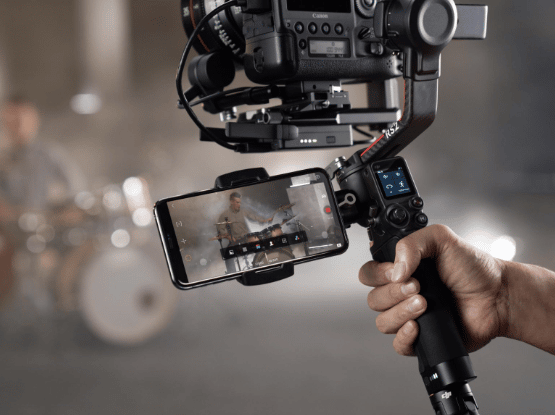
The RS 2’s higher tested payload is the decisive difference for a heavier compatible rig. Its carbon-fibre arm construction and control layout can remain useful without being the newest generation. A well-maintained existing RS 2 does not need replacing merely because a later product has a larger screen or faster setup.
However, do not buy an older unit on payload alone. Check the battery grip, charger, plates, cables, mounting screws, axis locks and any focus or transmission accessories included in the sale. A low body-only price can become poor value after replacing missing proprietary parts.
Tracking and camera control need the complete setup
Neither gimbal independently recognises and follows a subject just because the camera is mounted on it. DJI’s ActiveTrack workflows depend on the supported image-transmission accessories, app and configuration. A standard kit and a Pro Combo can therefore have materially different capabilities even when the stabiliser itself is identical.
If subject tracking matters, establish the complete signal path: how the camera supplies video, which transmission unit is included, what the phone displays and how the target is selected. Do not confuse camera autofocus with gimbal subject tracking. Nor should a claimed tracking mode be treated as permission to leave a moving camera unattended.
Check the real shooting workflow before buying
- Fit the exact camera, lens and plate, with the screen and cables in their working positions.
- Check all axes for clearance, including the shots you actually use rather than only an upright hold.
- Confirm recording control and focus functions independently against the camera compatibility list.
- Run a representative walk, slow pan and start/stop movement; review the saved footage for micro-jitter and horizon drift.
- Inspect motors, locks, grip attachment and battery charging on a used unit; avoid treating an app connection as a complete condition test.
Vertical bounce from walking and abrupt operator movement can remain visible even when the gimbal controls rotation well. Technique, lens choice and movement planning still matter. Buying a stabiliser will not turn every handheld move into a dolly shot.
Price, alternatives and the final decision
Compare the delivered price of complete usable kits, including a battery grip and any accessory required for your intended feature. Older launch prices, marketplace star averages and a generic returns period are not a sound basis for this decision. Warranty, battery cover and returns depend on the seller and region, especially for used or refurbished equipment.
A newer Ronin model may suit someone starting from scratch, but compare the exact payload and camera-control support rather than assuming every newer model improves every function. Read the RS 2 review for that model’s broader assessment, and distinguish the base stabiliser from the accessories bundled in a Pro Combo.
My verdict: choose RS 3 for its operational convenience when your actual rig is supported and comfortably balanced. Choose RS 2 when the higher payload and a complete, sound-condition kit solve a real requirement. Keep an existing reliable stabiliser if neither change materially improves your work.
For the broader product assessment, read the DJI RS 3 review.
Frequently asked questions
How many subjects can ActiveTrack follow?
A supported ActiveTrack setup follows a selected subject; it is not simultaneous independent tracking of several subjects. Confirm the required image-transmission accessories, app and supported configuration before buying.
Can I use an RS 2 or RS 3 as a phone gimbal?
They are designed for supported camera rigs. A phone running Ronin can control supported functions, but that does not make either stabiliser a practical substitute for a dedicated phone gimbal.
Is the RS 3 stronger than the RS 2?
Not by DJI’s tested payload: RS 3 is rated at 3kg and RS 2 at 4.5kg. Balance and mechanical clearance still determine whether a particular rig fits.
Does the RS 3 balance the camera automatically?
No. Automated axis locks are different from camera balancing. Balance the complete working rig before motor calibration and shooting.
Will Bluetooth control work with every camera?
No. Check the precise camera and firmware against DJI’s compatibility information. Recording control, focus and other functions can have different requirements.
Should I upgrade an existing RS 2?
Upgrade only for a specific workflow benefit. If the RS 2 supports your rig and works reliably, the RS 3’s convenience does not automatically justify replacing it.
Sources and image credits
DJI RS 2 support and specifications; DJI RS 3 support and FAQ.
Related Posts


Share this article

Stuart Kerr Spindlow is Pixoneye’s Publisher, Editor-in-Chief and Lead Product Reviewer. He tests consumer products and leads coverage of practical gadgets and personal-media preservation. His reviews focus on usability, limitations, value and the trade-offs that matter when choosing a product. Read Stuart’s full profile.
Leave a Reply